Connect the steps between interest and enrollment.
Project Performer needed to manage enquiries through trial booking, attendance and paid class registration. Without a structured process, it was difficult to maintain follow-up and see where each prospect stood.
The journey also needed to reflect how people preferred to communicate and which classes interested them. Class schedules and attendance information from Jackrabbit were relevant to the next follow-up, alongside age group and interests such as acting, singing or dance.
A main path. Clear routes for exceptions.
A website form captures each enquiry and communication preference. GoHighLevel then organises the booking and follow-up journey, using class information pulled from Jackrabbit to distinguish attendance and enrollment paths.
Before: the challenge to resolve
The areas that needed a clearer, more connected process.
- New enquiriesFollow-up needed to account for call or text preferences.
- Trial participationBookings, class attendance and registration needed to connect in one trackable journey.
- Later follow-upNurture needed to reflect attendance, age group, class interests and whether a prospect registered.
After: the connected process
Capture the preference
The website form records the enquiry and the choice of call or text-based follow-up.
Introduce the trial
The selected communication path shares trial information, a welcome video and a seven-day class-pass booking link.
Confirm the booking
Booking removes the contact from the booking-nurture workflow, starts confirmations and notifies the team.
Follow class participation
Class and attendance information from Jackrabbit informs the appropriate follow-up path.
Track enrollment
Pipeline stages distinguish registration and enrollment from prospects who need further nurture.
No booking after two days
A nurture sequence encourages the prospect to book the class pass.
A trial is booked
The earlier booking-nurture sequence ends and appointment confirmation begins.
Present or absent
Different follow-up sequences respond to the recorded attendance status.
Trial finished without registration
The prospect moves into a dormant stage for targeted re-engagement and longer-term nurture.
The pieces behind the process.
Preference-based enquiry handling
A website form and routing into either a call workflow using an auto dialer or a text-and-email workflow.
Trial booking and follow-up
Trial invitations, booking nurture, confirmation sequences and internal notifications, with the earlier nurture removed once a booking is made.
Class data in the journey
An integration pulling class schedules, categories and attendance status from Jackrabbit for use in the GoHighLevel process.
Segmented enrollment nurture
Attendance-based follow-up, campaign offers, dormant-lead re-engagement and longer-term nurture by age group and interest.
Reporting and team visibility
Pipeline stages, Google Sheets reporting and internal notifications for trial activity and the team's next actions.
Campaign rules for this project
The school's enrollment campaigns included a registration-fee waiver for immediate sign-ups and a 50% discount sequence for prospects who had not registered within the campaign's set timeframe. These describe the client's project-specific offers, not BusinessEye service pricing.
Class activity and later communication
The build included review requests and follow-up after the first class. Longer-term campaigns used age group and interests such as acting, singing and dance to distinguish the content sent.
From process map to configuration.
Explore the project screenshots and process maps for a closer look at the work.
 Open full size
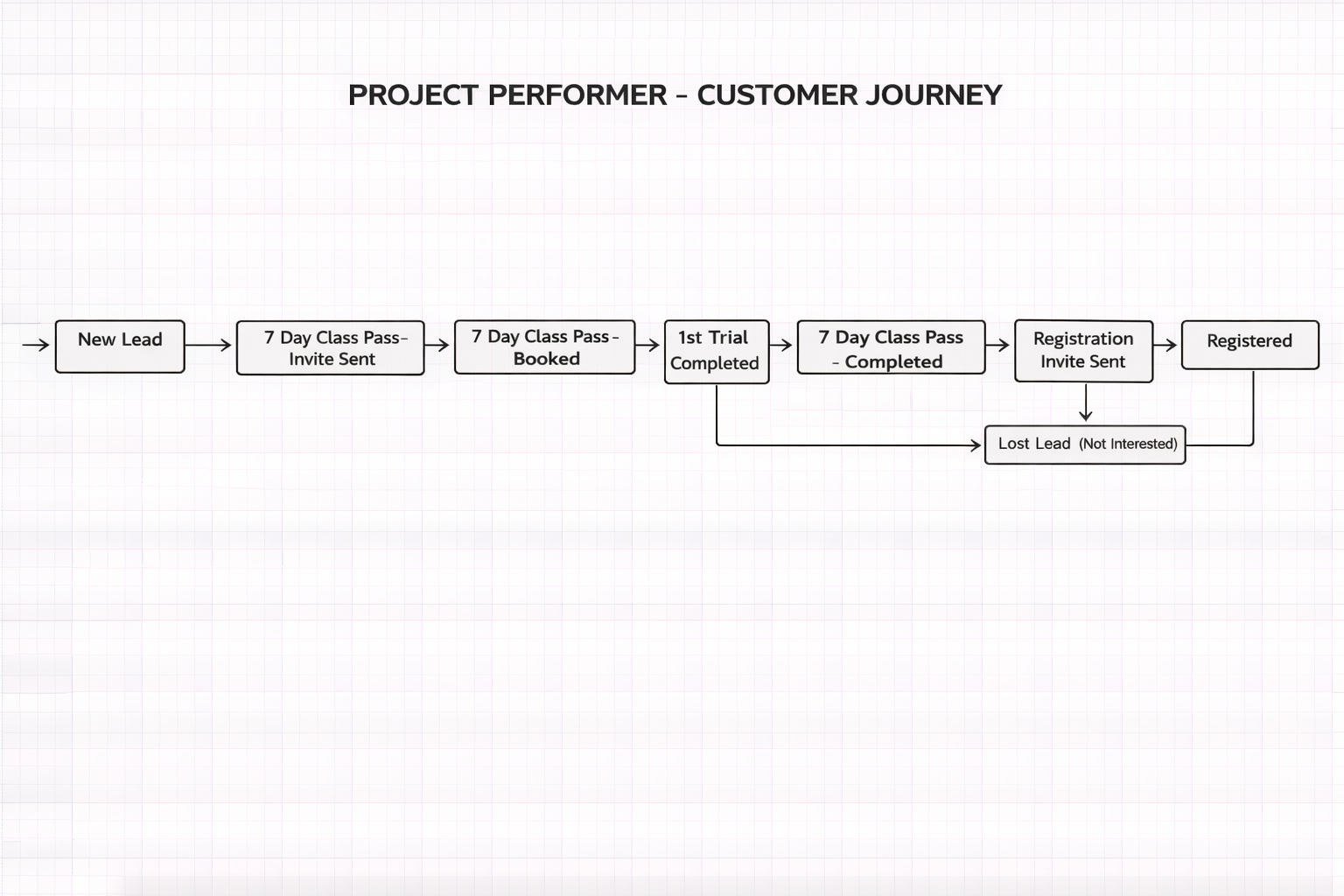
 The project journey brings enquiry handling, trial participation and enrollment stages into the same process.
A more structured way to work.
One view of the enrollment stages
The pipeline connects new enquiries, trial bookings, attendance, registration and enrollment.
Follow-up matched to the journey
Communication preferences, booking status and attendance each inform a distinct route through the system.
Class information connected to account work
Jackrabbit data, reporting and team notifications support the operational steps around trial participation and enrollment.